I didn't think I would make an app review, but here I am.
Earlier this month after many years I finally have a smart phone. I had the lollipop flip phone for about 2 years and the ice cream before that. I had an ipod touch though!
Anyways, I have been actively downloading and playing a lot of games.
I actually discovered this one a few days ago. It was open to international players pretty recently as well. I used Line Camera before so I am familiar with their mascots.
LINE PLAY!
More like homes to enter! Downloadable for the iOS and Android.
In order to start playing you have to download the Line Naver app. It's almost like Kakao Talk. You have a free instant message/call app which you can use to contact your friends and what not. I guess it's good for your international friends! You can also be social and play games with them, but of course you need to download each game individually.
LINE Play is very similar to Ameba Pico, TinierMe, Poupee Girl and some Facebook apps. You have your own avatar and a house to decorate. You can shop for furniture and clothes with your virtual currency known as gems.
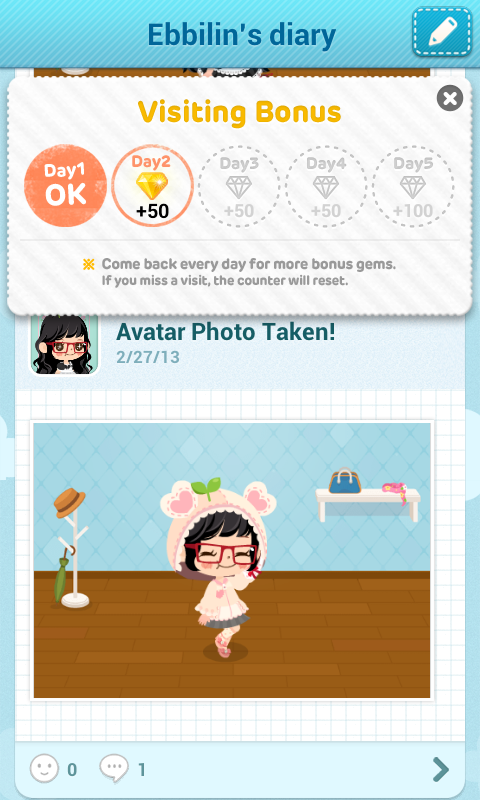
You start out with a simple room. You have a flower pot, a table and 2 chairs. You also have a diary which keeps all your daily outfit snapshots and diary posts. Other users can comment or leave you stickers for these snapshots.
Earning gems in the beginning is easy.
You can receive gems from entering other user's invitation codes. Simply go to your settings and click Profile. Once there you will see the Invitation Code section. You will see something similar to the image on the left. You can find your code there if you click the Invite. A small screen will pop up with your code which you can copy to your clipboard. If you want random people using your invitation code write a review for the game and leave your code there! You get 1000 gems if you enter one code and if other users enter yours, you also get 1000 gems. You can earn 14,000 gems from doing this. HOWEVER, this is not something you can do daily (from what I know so far). You can only punch in 5 codes yourself and only 9 other users can put in yours. After that, that's it. You have to earn gems other ways or pay for them!
Gems are crucial!
You want your house to be super cool and cute! Of course you need your own character to match.
There's a shop for clothing, furniture and the evil GACHAs.
You can mix and match tops, bottoms and accessories. You can buy clothes in set which is a bit cheaper than buying each piece individually. You can also try on the clothes by clicking the icons. The only problems I have with this is the loading time and the scrolling.
The furniture store is set up the same way. You can preview the furniture you want by clicking on it. You can also change your wall paper and tiles. My major problem with all this is the scrolling. It takes forever if you are looking for a certain set of furniture. I'm hunting for all the Chocolate Tier furniture. Prepare to scroll and let it load.
Honestly though you mainly need a bed, a bath, some kind of chair and food to satisfy your own character's needs!
This is what drives me nuts. Gachas are addictive because the item you get is random and you want to collect them all! There's a strong feeling of satisfaction boosted by endorphins when you get something you wanted. When you get something bad or a duplicate you just want to try for something better. (Gambling is bad for you.)
That's my avatar. I'm still working on my room haha. This game much like most apps now a days is all about being social and making friends. (Not social in a sense you need to actually talk to other users....you can though). You just have to click around a lot because that's how you earn more gems and hearts! You can invite your friends who also use Line Naver and earn 1000 gems.
How to earn more gems:
From what I know so far, you have a daily login bonus, and 3 daily tasks you can complete. You can keep track of your tasks by click on the gems in the upper right. The daily task for me resets at 4PM. I live in NY.
All you have to do is go to your friends, or other random peoples' houses and click click click. Each task gives you 10 gems. You can water their plants, clean their furniture, and give them hearts. All you have to do is click the bubbles that appear in the other user's home. You can make around 1000 gems per day. That may sound like a lot, but most furniture is about 1000 and above. You also earn gems from doing your own tasks. Once in a while your avatar will want to either sit down, sleep, eat or take a bath. If you don't have the right items in your room to complete the task, you can always use the items in other peoples' homes. You earn 5 gems for each personal task.
As you can see there's the water drop and broom icon in this house. Click the icons and both of you are happy! Hurray gems!
Let's say someone doesn't have a plant or a bath tub. Simply click Move then Random and you will be whisked away to another home.You can go from house to house by clicking on the Random button. This is me being a total creeper in someone's home.
20 tasks per category, 3 categories, that's a lot of clicks.
After your daily activities, it's pretty much a stand still. You can
chat with people in the lounge or just keep going through houses and
make friends. Look at how handsome James is. You can use the furniture
in his house I guess.
You can also copy paste your invitation codes (if you have not used them all) in the lounge area titled "Beginner." There's a specific chat room for that. You can also have 1:1 chats with your friends!
Your game keeps track of everything you do and what other users do to
you. It's all visible in the news section which you can access at the
front page. Click the speech bubble icon on the upper left to see your news. You get notifications when people send you hearts, use your invite code, or leaves a message.
After finishing all the daily tasks I like to rearrange my furniture or dress my avatar up several times.
Click the menu button when you are in your room followed by Room Deco. You will see a screen like the one above.
Some furniture you can turn in all 4 directions and some only turn in 2 directions. Keep that in mind when you are furnishing your home! Don't forget to save as well.
You can change your avatar's clothes by clicking Menu then Closet while in your room. You click/check whatever you want them to wear and voila! (SAVE) It will ask you if you want to update your diary. I normally don't but do what you want!
My invite code is UM-8866-3205 (expired).
Feel free to add me. My user name is Ebbilin
Happy clicking!